
Find the FACEIT account behind a Steam profile
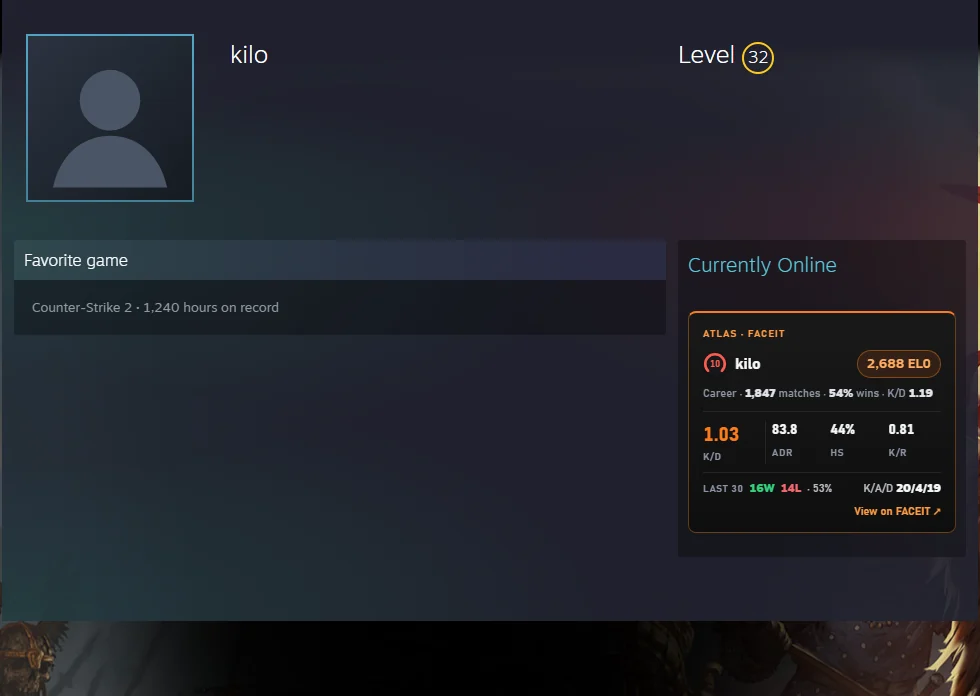
Atlas for FACEIT adds a small card to Steam Community profile pages with the CS2 FACEIT account linked to that Steam account — level, ELO, career numbers and recent form — and a link straight to the FACEIT profile. No searching by name, no third-party finder sites.
Add to Chrome — free Free · no account · Chrome, Edge, Brave, Opera
How the lookup works
Every FACEIT CS2 account is tied to one Steam account. Atlas reads the SteamID64 from the Steam profile page — from the address on /profiles/… links, or from the page itself on custom /id/… links — and asks FACEIT's official Data API which CS2 player, if any, is linked to it. The answer comes back through the Atlas backend, which only forwards the query and caches the result.
What the card shows
- Level and ELO, with the FACEIT nickname
- Career — matches played, win rate and K/D
- The last 30 matches — K/D, ADR, headshot %, kills per round, wins and losses, and total kills/assists/deaths
- View on FACEIT — a link to the player's FACEIT profile
Where it appears, and where it doesn't
The card sits in the right column of the profile, under the online status. It only runs on the main profile page: inventory, friends, badges and other sub-pages are left alone. When the Steam account has no CS2 FACEIT account linked, the card says so — No CS2 FACEIT account linked to this Steam — instead of guessing. If you'd rather not see it at all, switch off FACEIT account on Steam profiles in the Atlas options.
What Atlas does not do on Steam
It reads nothing from your Steam account, it doesn't touch the inventory or the market, and it adds nothing to the page beyond the card. The card follows the Atlas language setting (English, Portuguese or Russian).
How to use it
- Install Atlas for FACEIT from the Chrome Web Store.
- Open any Steam Community profile (
steamcommunity.com/profiles/…orsteamcommunity.com/id/…). - The Atlas card appears in the right column; click View on FACEIT to open the player's FACEIT profile.
Questions
Does it work on private Steam profiles?
Yes, as long as the profile page itself opens. Atlas only needs the Steam ID, which is part of the page even when the inventory and friends are private.
Can it find a FACEIT account from a Steam name instead of a profile?
No. Atlas works from the Steam profile page you have open; it doesn't search by name. Open the profile first, and the card does the rest.
Does Atlas send my own Steam data anywhere?
No. The only thing that leaves your browser is the SteamID64 of the profile you are looking at, sent to the Atlas backend to ask FACEIT's API about it. See the privacy policy for the full picture.