
FACEIT server ping, measured by FACEIT
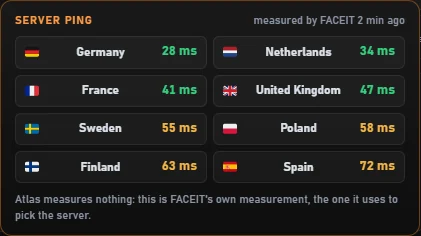
Atlas for FACEIT shows your ping to each FACEIT CS2 server region next to the server names and in the lobby. It doesn't run its own ping test: it reads the measurement FACEIT already makes in your browser — the same one FACEIT uses to pick your server.
Add to Chrome — free Free · no account · Chrome, Edge, Brave, Opera
Why a separate ping test would be wrong
A ping test from a website measures the path to that website's servers, not to the game servers. FACEIT already measures your latency to its server regions in your browser and stores the result. Atlas simply shows that measurement where it's useful, so the number you see is the one FACEIT works with.
Where you'll see it
- Next to every server in the server veto and in the match-found window, when FACEIT exposes them
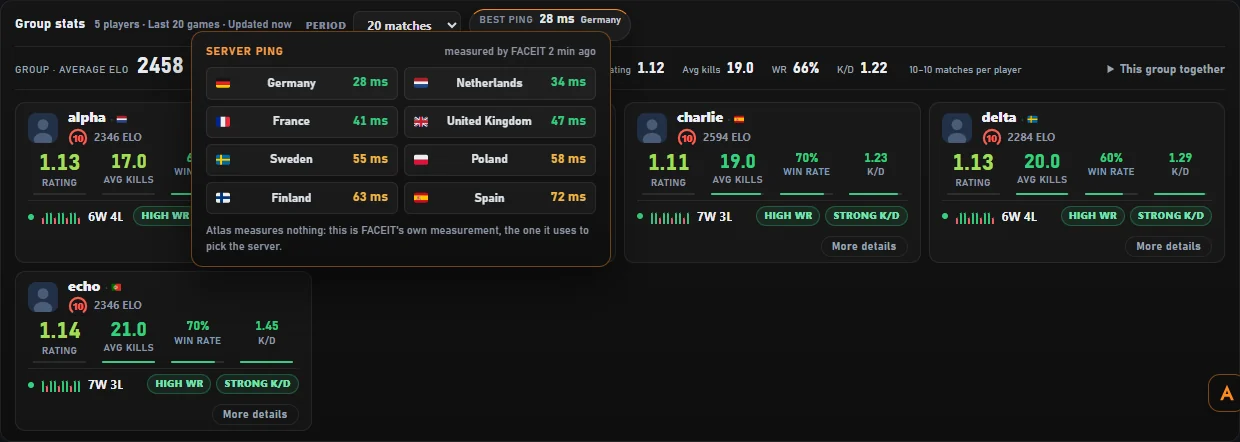
- A panel with every region, opened from the best-ping badge in the lobby, colour-coded from fast to slow
- How old the measurement is — measurements older than 30 minutes aren't shown as current
In the lobby, with your party
In the matchmaking lobby, Atlas also shows your party's stats at a glance — average ELO, rating, kills, win rate and K/D for each player — next to the best ping badge.
How to use it
- Install Atlas for FACEIT from the Chrome Web Store.
- Open the FACEIT matchmaking page once, so FACEIT can run its own ping measurement.
- Click the best-ping badge in the lobby to see every region; in the veto, the ping appears next to each server.
Questions
Does Atlas send pings or extra traffic?
No. Atlas makes no ping requests of its own. It reads the value FACEIT already measured in your browser.
Why is the ping missing sometimes?
If FACEIT hasn't measured it recently (or the measurement is older than 30 minutes), Atlas doesn't show an old number as if it were current.
Is this my in-game ping?
It's FACEIT's measurement from your browser to each region. In-game ping can differ slightly, but it's the value FACEIT uses for server selection.